Field guide
Pull a Dino Wiki: Codes List and How to Redeem
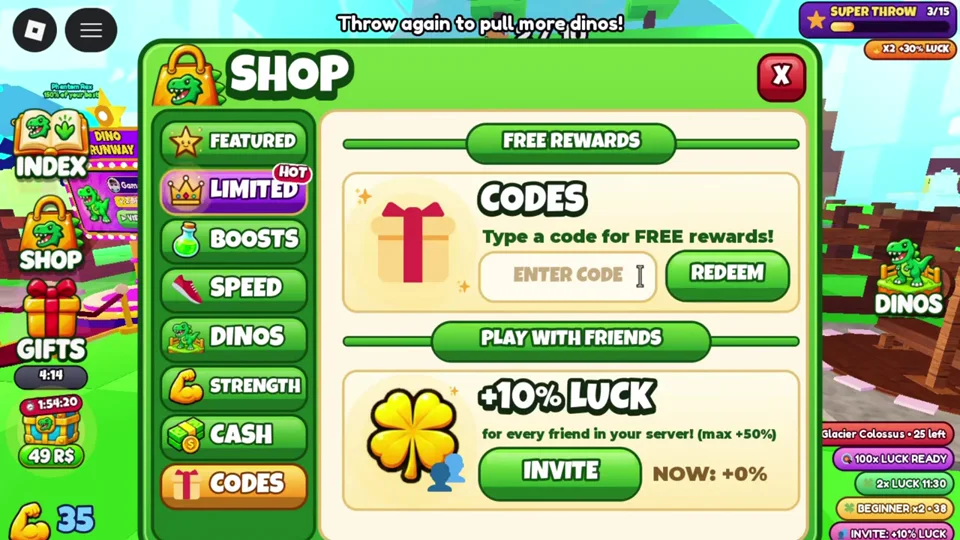
The developer-listed Pull a Dino code is NEWUPDATE for 50x luck on your next throw as of the November 16 description, which you can claim through the orange Codes tab inside the Shop sidebar.
ON THIS PAGEDeveloper-Listed Code and Unverified Community ReportsHow to Redeem Codes in Pull a DinoCode Redemption Troubleshooting
Developer-Listed Code and Unverified Community Reports
Below is the code listed by developer dawyd02 in the November 16 English game description, alongside older community-reported strings. Live availability is not self-tested, and we recommend saving a next-throw luck code until after you have practiced stopping the throw slider at its top and trained on benches. How code boosts interact or stack with other luck sources is not verified.
| Code | Listed Effect | Provenance and Status |
|---|---|---|
| NEWUPDATE | 50x luck on next throw | Confirmed in the developer's November 16 English description; live availability not self-tested. |
| VOLCANO | Unverified | Community report from older video and web sources; not verified live. |
| Pulladino | Unverified | Community report from older video and web sources; not verified live. |
| RELEASE | Unverified | Community report from older video and web sources; not verified live. |
| Haniadagahubert | Unverified | Community report from older video and web sources; not verified live. |
| Thebestgame | Unverified | Community report from older video and web sources; not verified live. |
How to Redeem Codes in Pull a Dino
Follow the in-game Shop interface flow to submit a code:
- Click the Shop button in the game interface.
- Choose the orange Codes tab located near the bottom of the Shop sidebar.
- Type your code into the Free Rewards text field.
- Click the green Redeem button.
- Watch for the confirmation banner on screen to verify the claim succeeded.
Code Redemption Troubleshooting
If a code does not grant a reward right away, check these common redemption issues:
- Look for the confirmation banner: The typing animation inside the Free Rewards field only shows text entry and does not mean a code was claimed. Only the confirmation banner after clicking the green Redeem button confirms success.
- Check spelling and whitespace: Retry the exact capitalization shown above and remove any trailing spaces before clicking Redeem.
- Check for prior use or expiration: An already-redeemed message indicates the code was claimed earlier on your account, while older community-reported codes may be retired by the developer.